Pick your AI/ML Path on Google Cloud

Rising C. Harry
Many users within an organization play important roles in the machine learning (ML) lifecycle. There are product managers, who can simply type natural language queries to pull necessary insights from BigQuery, data scientists, who work on different aspects of building and validating models; and ML engineers, who are responsible for keeping the models working well in production systems. Each of theses involves different needs, and this post covers the Google Cloud M and AII services that are available to help meet those needs.
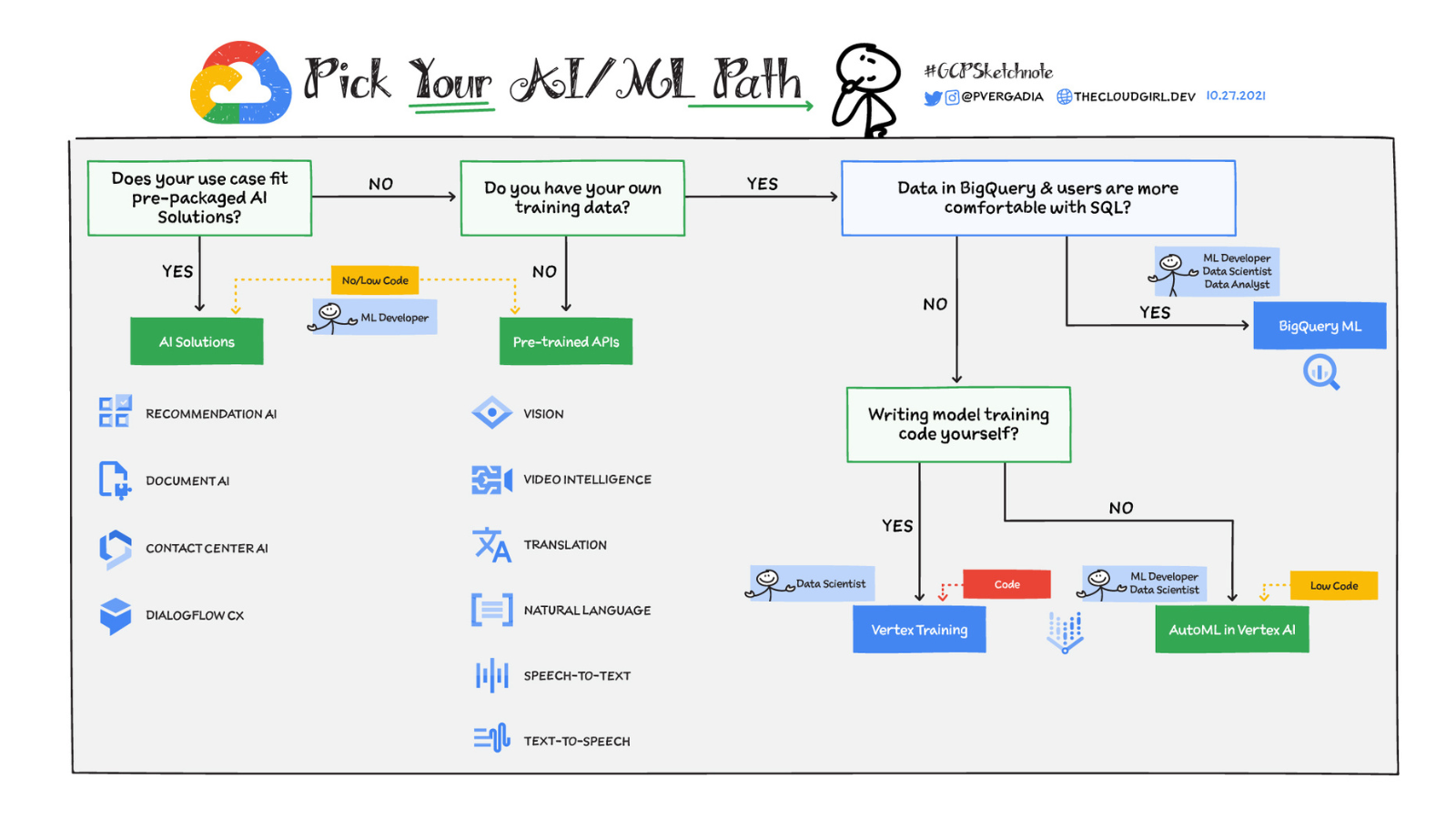
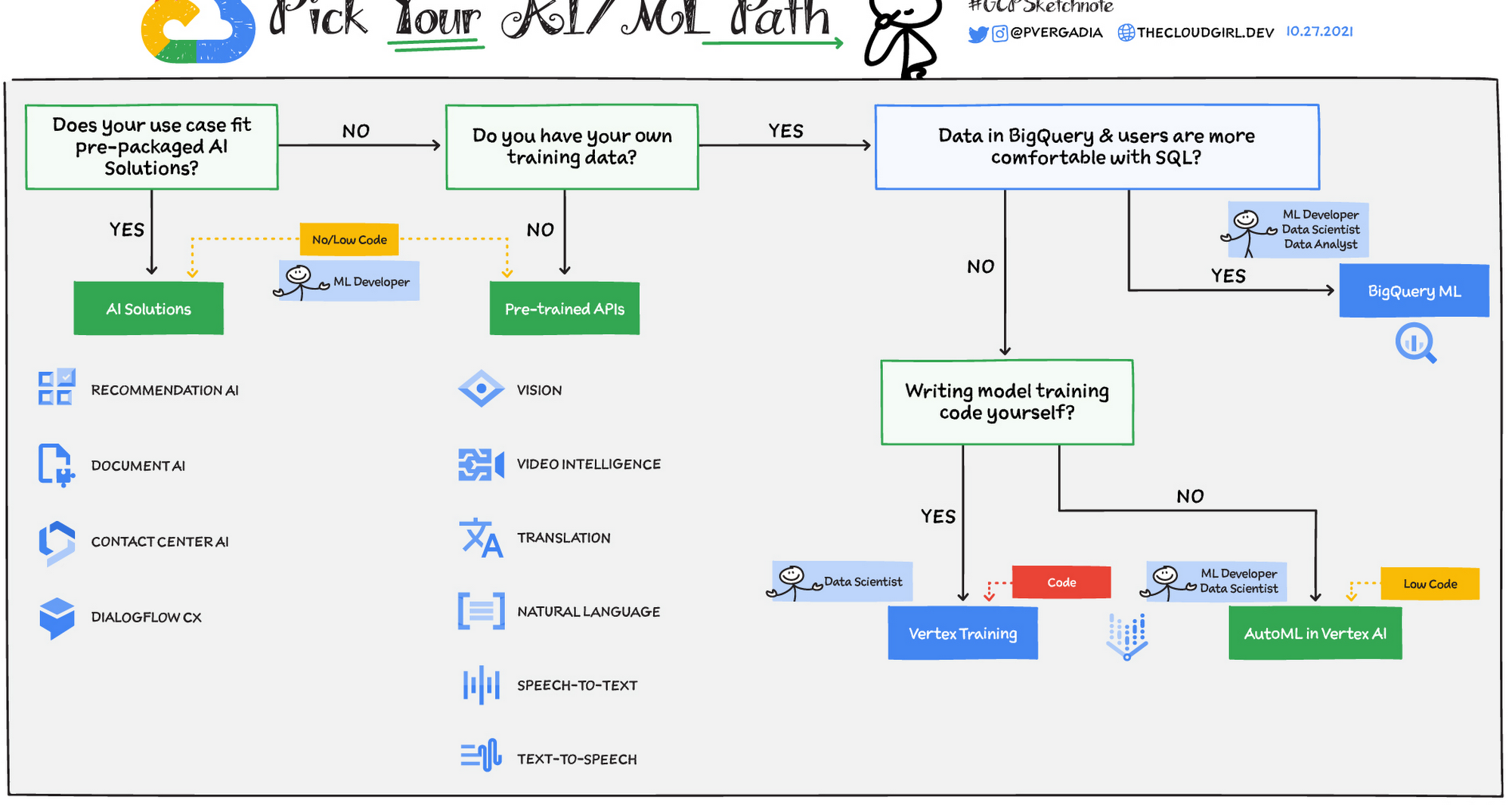
Pick your AI/ML Path The services that will work best for you will depend on your specific use case and your team's level of expertise. Because high-quality ML models require a significant amount of effort and ML expertise to build and maintain, a general rule of thumb is to use pretrained models or AI solutions whenever possible – that is, when they fit your use case. If your data is misstructured and in BigQuery, and your users are already comfortable with SQL, then choose BigQuery ML. If you realize that your use case requires writing your own model code, then use thee custom training options in Vertex AI. Let’s look at your options in more detail.
Prepackaged AI Solutions Both pretrained APIs and prepackaged AI solutions can be used without prior ML expertise. Here are three prepackaged solutions that can be used directly: Contact Center A:- Create rich and natural conversational experiences across devices and platforms using an AI-powered virtual agent, insights derived from customer interactions, and agent assist features.
Document A:- Tap into your unstructured data (such as images and PDFs) and make it accessible using Google computer vision (including OCR) and natural language processing (NLP) capabilities to increase operational efficiency, improve customer experiences, and inform decision-making. Recommendations AI - U: machine learning to deliver recommendations personalized for each customer’s tendencies and preferences across all touchpoints.
Pretrained APIs If you don’t have any training data to train a model and you have a generic unstructured data use case such as video, images, text, or natural language, then a pre-trained API would be a great choice for your AI/ML project. Pretrained APIs are trained on a huge corpus of generic, unstructured data that is built, tuned, and maintained by Google. This means you don’t have to worry about creating and managing the models behind them
Vision AI - Derive insights from your images in the cloud or at the edge with Auto ML Vision or use pretrained Vision API models to detect emotion, understand text, and more. Video AI - Enable powerful content discovery and engaging video experiences. Translation AI - Make your content and apps multilingual with fast, dynamic machine translation.
Language AI - Derive insights from unstructured text using natural language understanding (NLU). Get insightful text analysis that extracts, analyzes, and stores text. Speech-to-text API - Accurately convert speech into text (and vice versa with Text-to-speech API) to deliver a better user experience.
BigQuery ML If your training data is in BigQuery and your users are most comfortable with SQL, then it likely will make sense for your data analysts and data scientists to build ML models in BigQuery using BigQuery ML. You will have to make sure that the set of models available in BigQuery ML matches the problem you’re trying to solve. BigQuery ML offers simple SQL statements to build, train, and make predictions within the BigQuery interface or via the API.
Vertex AI Vertex AI offers a fully managed, end-to-end platform for data science and machine learning. If you need to create your own custom models with your own data, then use Vertex AI. Vertex AI offers two options to train models: AutoML and custom training. Here is how to choose between these two options:
Use case: If your use case fits a supported AutoML offering, then starting with AutoML is a good choice. This includes use cases involving data types such as image, video, text, and tabular. But if your model takes a mixed inputtype,e such as images and tabular metadata, then it makes sense to use a custom model.
Requirements: If you need control over your model's architecture, framework, or exported model assets (for example, if your model needs to be built with Tensor Flow or Pytorch), then use a custom model. Team expertise: How experienced is your team with machine learning and /AI? If you have a team with limited experience in building custom models, then explore Auto ML before you look into custom model development.
Team size: If you have a small data science and ML team, then it may make more sense to work with Auto ML because custom model code requires more time to develop and maintain. Prototyping: Use AutoMLL if you want to develop a quick initial model to use as a baseline. You can then decide if you want to use this baseline as your production model or look to improve upon it by developing your own custom model. For a more in-depth look into Service Directory, check out this documentation or start with the detailed Vertex AI videos. Also, join us on June 9th at a.m. PST for the Applied ML Summit to learn more about the process of successfully shipping machine learning models into production..